PIKTOCHART · DESIGN TOOL FOR NON-DESIGNERS

AI Image Prompt Enhancer

Type a few rough words. Get the image you actually meant.

By Anil Kumar Giridhar · Senior Product Designer
Six weeks, idea to ship · March 2026 • Live in production
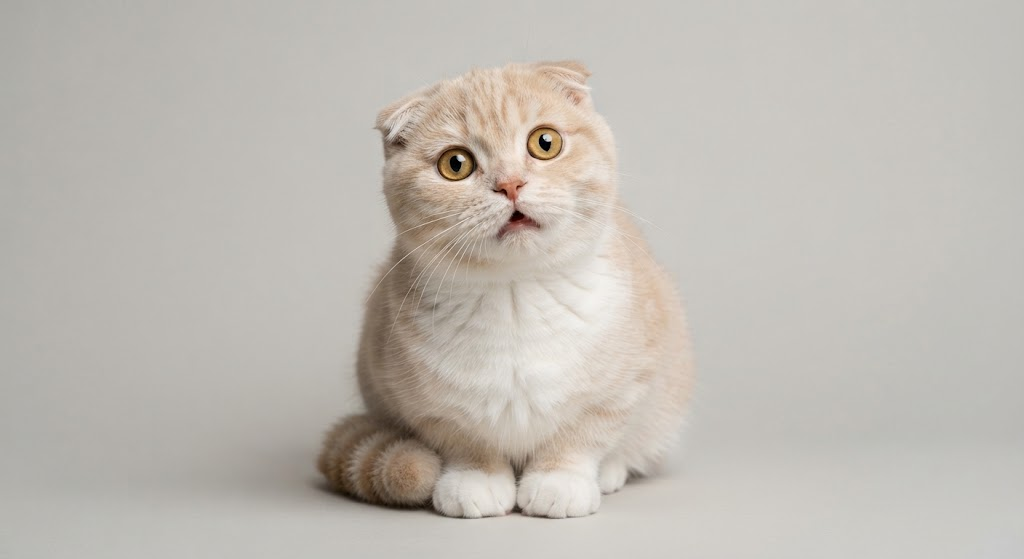
Generated from the raw prompt: a plain studio shot of a cream Scottish Fold on a grey backdrop
What they type Enhance off

“a funny cute cat”

Technically a cat. Nothing funny about it, no setting, no story. The model filled every gap with the most average choice.

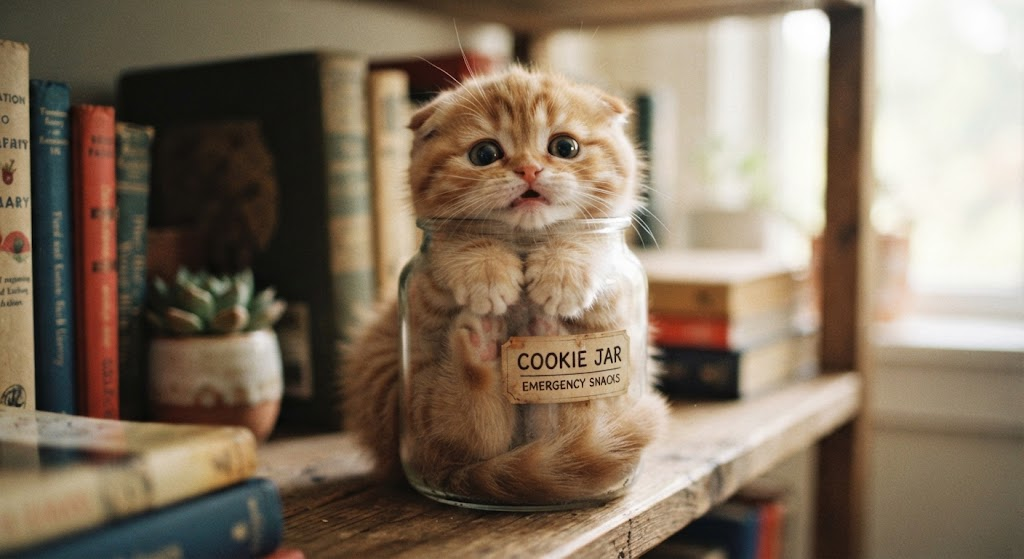
Generated from the enhanced prompt: an orange tabby kitten squished inside a glass jar labelled Cookie Jar, Emergency Snacks, on a rustic bookshelf
What it hands back Enhance on
1 of 10 Amusing Feline
Full body shot Soft directional light Relaxed and endearing

A photorealistic full body shot of a fluffy, orange tabby kitten amusingly squished inside a clear glass jar labeled “COOKIE JAR - EMERGENCY SNACKS,” sitting on a rustic wooden bookshelf. The kitten has wide, wide-eyed expressions of slight confusion and a slightly tilted head, with delicate whiskers, tiny paws pressed against the glass, and soft fur details. Warm, soft natural window light creates subtle highlights and shadows across the scene, with sharp focus on the kitten’s face and bright catchlights in its eyes. The background features vintage books and a small potted succulent softly blurred with a smooth bokeh effect. The centered composition captures the hilarious yet adorable posture, with high fidelity rendering bringing out vivid textures in the glass, wood, and fur.

One of ten directions it hands back. The joke, the setting and the light are written in, so the model doesn’t have to guess.

01 In Piktochart
The flat result: a plain studio cat on grey

“a funny cute cat”

Generated · flat
02 Somewhere else
Another AI model

Write me a better image prompt for: a funny cute cat

03 Back in Piktochart
Pasted into our input Someone else’s words

**Create an image of:**
• a funny cute cat, photorealistic
• lighting: warm golden hour
• lens: 85mm, shallow depth of field
• mood: playful, candid

Reconstructed from the prompt logs. The same round trip, again and again.

The problem

A funny cute cat

It started with something in our prompt logs that didn’t look right.

Most people type the way you’d expect: a few words, no punctuation, “a funny cute cat.” But a lot of prompts had bullet points, headings, camera lenses, even lighting setups. Nobody writes like that in a small text box. Those prompts had been written somewhere else and pasted in.

So people were typing a few words, getting a flat image, going to another AI tool for better words, and coming back just to press generate.

They came to us for the picture and went somewhere else for the thinking.

I had six weeks to fix that.

Piktochart

Piktochart is a design tool for people who aren’t designers.

  • MakesInfographics, reports, presentations and social posts
  • Used by34M+ people: business teams, educators and non-profits
  • Mostly inNorth America and Europe
The bet

Bring the writing in-house, and the whole creative loop stays inside Piktochart.

The stakes

34 million users.
Me, two engineers, six weeks.

If people step out for one job and come back, that isn’t a workflow. It’s a warning. Today they leave for the words. Tomorrow they stay in the other tab.

RoleFeature owner, design and productUX, prompt system, model contract
Team3 peopleMe + 2 engineers
ShippedMarch 2026Six weeks, idea to ship
The part that stungEvery retry cost credits. The credits weren’t buying images. They were buying guesses.
Call 01

Nobody knows what they want.
They know it when they see it.

So stop asking people to write. Give them something to react to. My first answer to that was too expensive.

Option A ×

A preview image under every suggestion

Obvious, and ten generations deep. Slower, pricier, every single time.

Option B · shipped ✓

A title, three tags, the full prompt one tap away

Recognition, done in text. Instant and free to render.

Three months laterNobody has asked for the thumbnails.
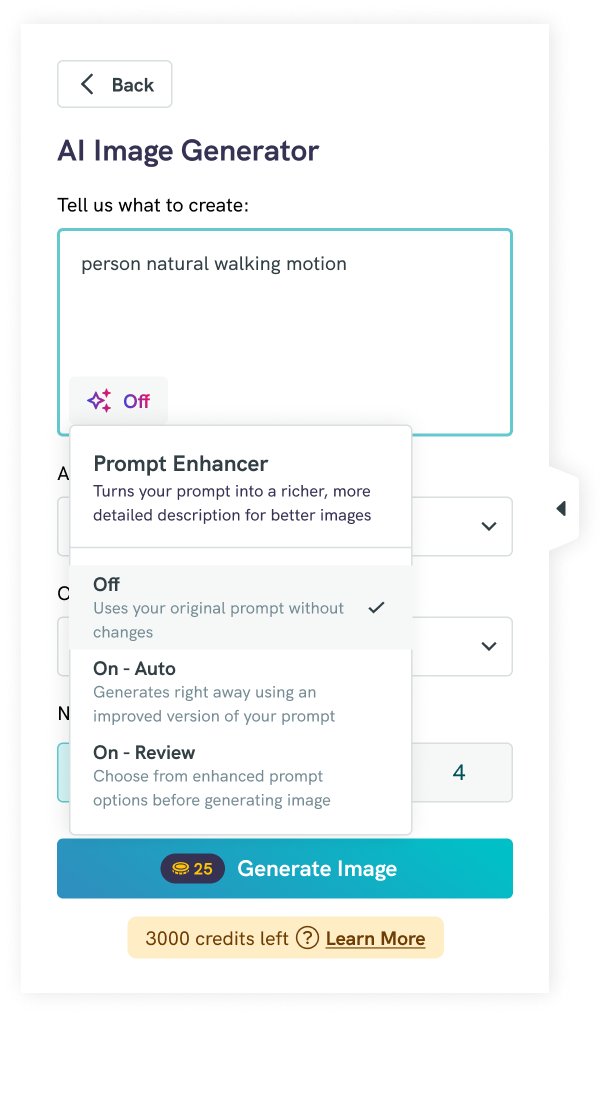
AI Image Generator with the Prompt Enhancer dropdown: Off, On-Auto, On-Review
The shape of it

Three ways in.
One of them invisible.

Off

Your words, untouched.

On-Auto

Upgrades and generates. One tap, no reading.

On-Review Power users

Ten directions to choose from, then tune it.

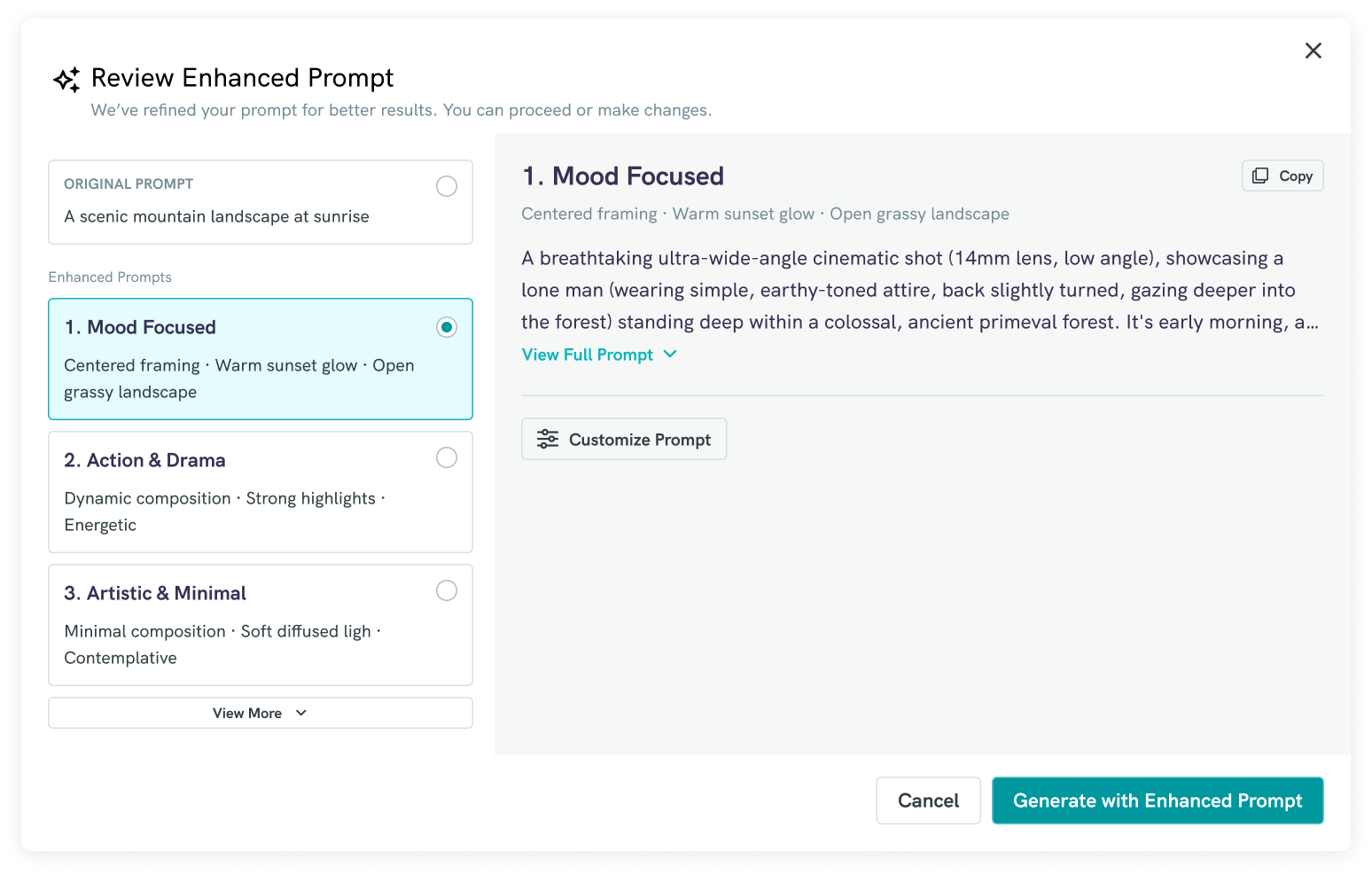
Review Enhanced Prompt: ten enhanced prompts with titles and attribute tags
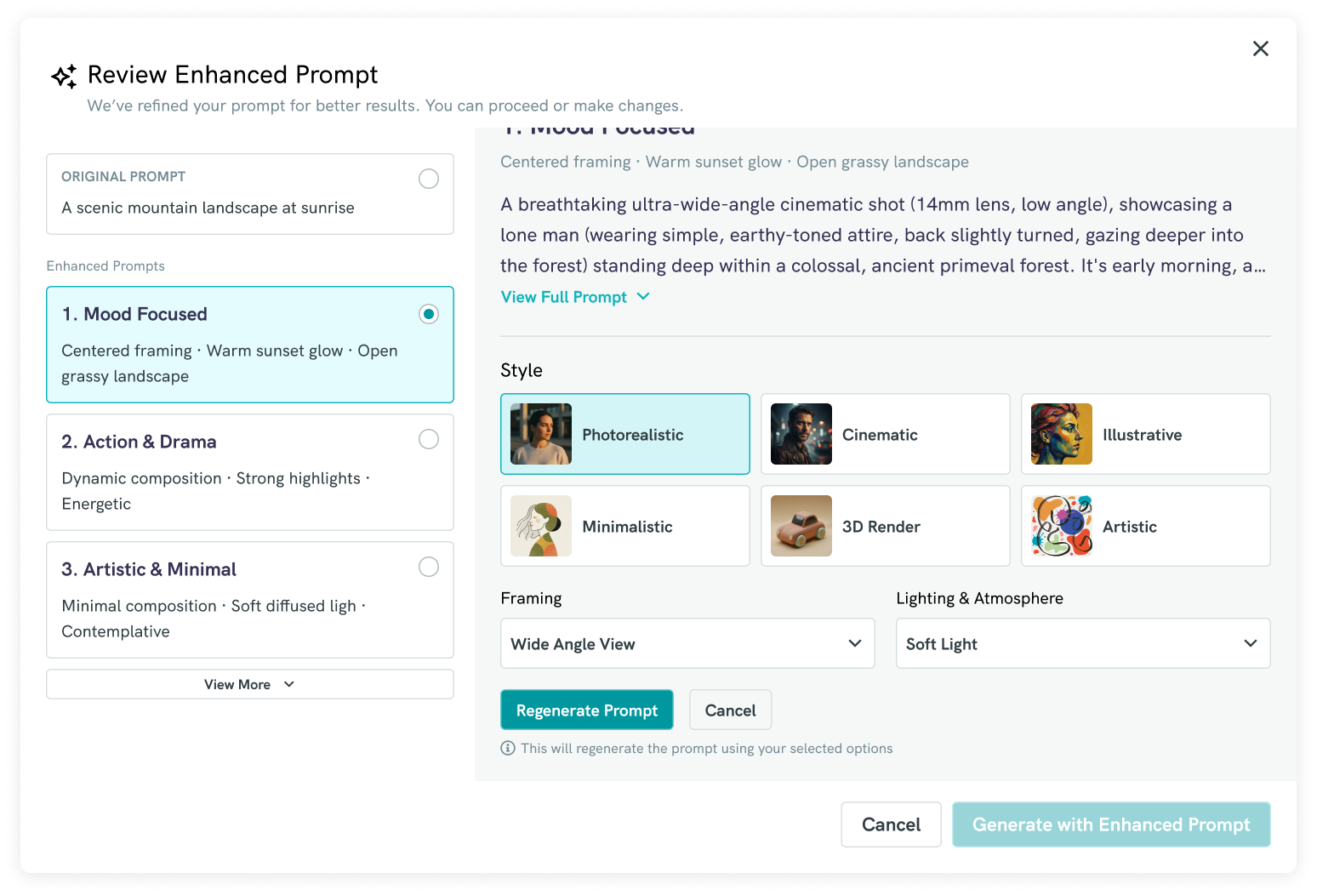
Customize Prompt: Style, Framing, and Lighting and Atmosphere controls
On-Review

Ten directions.
Four seconds to pick one.

1
Read the intent
2
Spread it across ten territories

Mood, setting, style, composition, narrative.

3
Title and tags, not paragraphs

Scannable, so choosing feels like pointing.

4
Close but not it? Turn the dials

Steer without going back to a blank box.

StyleFramingLighting & Atmosphere
The whole thing, moving

Same prompt, same user.
Toggle on, toggle off.

Piktochart’s launch walkthrough · the last shot is the one that matters
Inside the answer

They typed four words.
The enhancer wrote the rest.

What they typed 4 words

a funny cute cat

What it wrote 122 words
1 of 10 Amusing Feline

A photorealistic full body shot of a fluffy, orange tabby kitten amusingly squished inside a clear glass jar labeled “COOKIE JAR - EMERGENCY SNACKS,” sitting on a rustic wooden bookshelf. The kitten has wide, wide-eyed expressions of slight confusion and a slightly tilted head, with delicate whiskers, tiny paws pressed against the glass, and soft fur details. Warm, soft natural window light creates subtle highlights and shadows across the scene, with sharp focus on the kitten’s face and bright catchlights in its eyes. The background features vintage books and a small potted succulent softly blurred with a smooth bokeh effect. The centered composition captures the hilarious yet adorable posture, with high fidelity rendering bringing out vivid textures in the glass, wood, and fur.

Aa Their words, kept The joke Setting Light Camera
What it didn’t doIt didn’t change what they asked for. Funny, cute and cat are all still in there. It filled in everything they didn’t think to say.
Call 02

I wrote the prompts
like a screen spec.

Two prompts do all the work. The first turns a rough idea into ten directions. The second rewrites one of them when someone changes a setting. Every field they return has a place on screen.

1
EnhancerRuns when someone hits generate
Gemini
In
The idea, as the user typed it
Out
10 directions, as JSON
Backup
ChatGPT, if Gemini fails
  • Style from a fixed set of six, so the picker never changes shape
  • Every other field inferred from the idea
  • Labels, not prose: “Warm sunset glow”
  • Vague input infers, never fails
2
CustomizerRuns when someone changes a setting
Gemini
In
The chosen direction and the new settings
Out
1 updated prompt, linked to the last version
Backup
ChatGPT, if Gemini fails
  • Change only what the user picked
  • Keep the subject and the scene
  • The user’s choice wins on conflict
JSON field maps to interface
titleCard heading
visual_attributesTags under each title
styleSix-option picker static
dynamic_fieldsFraming and Lighting inferred
summaryDefault settings, preselected
full_promptSent to the image model
Model choice

Gemini won on intent, cost and latency. Image-native models were worse at strict JSON, which was the whole contract. As a fallback, the same request went to ChatGPT instead.

Calls 03 and 04

Two arguments.
I lost one, and won one against myself.

V1The modal · what I believed

Interrupting someone mid-creation breaks the rhythm. I lost that one.

V2What happened

V1 shipped as a capped experiment: the modal, every time. 96% completed, but the recordings still showed the interruption. V2 replaced it the next release with three modes — Off, On-Auto, On-Review.

The price · what I believed

Every AI call should cost credits. That’s how the rest of the product works.

What changed my mind

Enhancement is a text call. It costs pennies, and this feature exists to stop people burning credits. Shipped free.

Launch reel · 1:01 · Watch on Instagram ↗
Follow-up reel · 1:18 · Watch on Instagram ↗
The launch

A blog post, a help article
and two reels.

Piktochart announced it on the blog, documented it in the help centre, and posted two reels on Instagram. That’s the promotion behind April’s number on the next slide.

After launch

Three out of four
used what it wrote.

34.2K

people tried it by early June

96%

got their ten directions back

72.6%

of them generated an image with one

Adoption Unique users of the enhancer by month · data through May
Unique users of the prompt enhancer by month, through May 2026 March 2026: 362, a partial month after a late-March launch. April: 16,434. May: 15,560. Data pulled in early June, so June is not shown. March 2026: 362 users, partial month (shipped late March) 362 April 2026: 16,434 users 16,434 May 2026: 15,560 users 15,560 Mar Apr May shipped late Mar

April was launch month, with promotion on Piktochart’s channels. May had none and still held at 95%. March is hatched because it launched late in the month.

Completion What happened after the toggle went on · every bar is a share of the 34,170 triggers
Prompt enhancement funnel Every percentage is a share of the 34,170 people who triggered an enhancement. Enhance triggered 34,170, 100 percent. Enhanced prompt generated 32,850, 96.1 percent. Enhanced prompt used 24,810, 72.6 percent. Fell back to the original prompt, 668, 2.0 percent. Enhance triggered: 34,170 (100% of triggers) Enhance triggered 34,170 100% Enhanced prompt generated: 32,850 (96.1% of triggers) Prompt generated 32,850 96.1% Enhanced prompt used to generate an image: 24,810 (72.6% of triggers) Enhanced prompt used 24,810 72.6% Fell back to the original prompt: 668 (2.0% of triggers) Fell back to original 668 2.0%

The last bar is the fallback, not a drop-off. Nobody hit a dead end.

Prompt enhancer adoption and completion
MonthUnique users
Mar 2026362
Apr 202616,434
May 202615,560
Funnel stepUsers
Enhance triggered34,170 (100%)
Enhanced prompt generated32,850 (96.1%)
Enhanced prompt used24,810 (72.6%)
Fell back to original prompt668 (2.0%)

Every figure here is against the 34,170 people who turned the enhancer on inside the AI image generator — not Piktochart’s 34M registered accounts, which this feature never sat in front of.

The number that looks badGenerations per user went down. On most features that reads as disengagement. Here it meant the first image was right.

Where it went next

  • Every generator in the appThe enhancer ships beside all of them
  • The schema became the baselineOther AI features reuse the contract
  • AI Design Reviewer, AI Copy RewriterThe next bricks of the suite
Judgment

Four things didn’t make it.
Three I’d cut again.

a.

Preview thumbnails

Cut on cost.

b.

Per-enhancement credits

Cut on principle.

c.

Prompt history

Cut for the deadline. It comes back.

d.

Talking to users first

Cut for speed. This is the one I’d put back.

“The logs told me what people were doing. Interviews would have told me why. I had six weeks, so I bought the what.”

The call I’d take back
The rest of the suite

The enhancer was one of six.
I owned the whole AI suite.

Same question behind every one of them: where is the user doing work the product should be doing for them?

✦ Review Enhanced Prompt
Original prompta funny cute cat
1. Amusing FelineFull body shot · Soft directional light
ReleasedYou just saw this

AI Image Prompt Enhancer

Turns a few rough words into ten directions for the image generator.

AI Video Generator
T  Text to Video▣  Image to Video
Tell us what to create:
A peaceful forest trail in autumn💡 Inspire Me
AI Model
Sora 2 ⌄
250 Generate Video
Released

AI Video Editor

Generates video from a text prompt or an image, with a choice of model.

Rewrite with AI
10 per rewrite
  • Rewrite
  • Make Shorter
  • Make Longer
  • Improve Clarity
  • Fix Spelling & Grammar
  • Change Tone ›
Coming soon

AI Copy Rewriter

Rewrites any text in a design: shorter, longer, clearer, corrected, or in a different tone.

Leadership Mentor Expert Coaching10 findings
8.2/10Scorecard
⭐ Strong design. A few tiny tweaks and you’re hitting pro standards.
Layout03 findings
Elements too close togetherPage #2

Increase spacing between text blocks and images

Spacing03 findings
Coming soon

AI Design Reviewer

Scores a design out of ten and lists what to fix, by layout, spacing, colour, readability and hierarchy.

Edit content from this image

Convert text and visuals into fully editable layers.

Make it editable
×
Coming soon

AI Templatizer

Turns the text and visuals in a flat image into fully editable layers.

THAT’S THE STORY

The fix for a blank box
was never a better blank box.

It was giving people something to react to.

AG

Anil Kumar Giridhar

Senior Product Designer · Feature owner

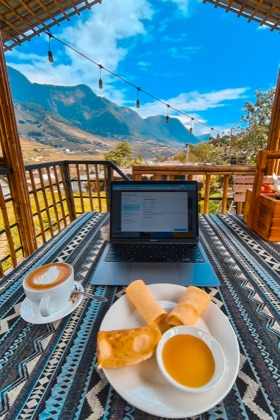
A MacBook showing the Review Enhanced Prompt modal on a bamboo terrace in Sa Pa, Vietnam, mountains behind it
Where it was designed

Most of this feature was designed from a terrace in Sa Pa, Vietnam. That’s the review modal on the screen.

Prompt 1 of 2 · sent to Gemini, ChatGPT as fallback

Enhancer

Turns the user’s idea into ten directions. Runs when someone hits generate.

You are an AI prompt enhancer for image generation.

Your task is to convert a user’s idea into multiple clear visual directions that improve image quality and reduce trial and error.

Each enhanced prompt must

Strict rules

Language rules

Output

Return 10 enhanced prompt suggestions.

Always return valid JSON using the exact structure below.

Response format

{
  "suggestions": [
    {
      "title": "",
      "visual_attributes": [],
      "customization_options": {
        "style": [],
        "dynamic_fields": [
          { "field": "", "options": [] }
        ]
      },
      "summary": {
        "scene": "",
        "subject": "",
        "lighting": "",
        "environment": "",
        "style": ""
      },
      "full_prompt": ""
    }
  ]
}

Field rules

title
  • 2–3 words
  • noun phrase
visual_attributes
  • 2–3 abstract noun phrases
  • mood / tone / aesthetic only
  • used as UI tags
customization_options.style
  • ALWAYS present
  • fixed set of styles: ["Photorealistic", "Cinematic", "Minimalist", "Illustrative", "3D Rendered", "Artistic"]
customization_options.dynamic_fields
  • array of fields relevant to this prompt
  • each field must include:
    • field name (e.g. lighting, mood, framing, environment, atmosphere, camera)
    • 3–6 selectable options
  • include ONLY fields that make sense for this prompt
  • do NOT invent meaningless fields
summary
  • reflects the default selected values
  • style always present
  • other fields only if relevant
full_prompt
  • single compact paragraph
  • generated using the default summary values
  • neutral, generation-ready tone
  • 2–3 sentences maximum

Important

Input

User idea: {{USER_INPUT}}

Model: the default Gemini model on the backend. If Gemini fails, the same prompt goes to ChatGPT.
Prompt 2 of 2 · sent to Gemini, ChatGPT as fallback

Customizer

Rewrites one chosen direction with the user’s new settings.

Engineering note, not sent to the model. Implement an endpoint that creates an enhanced prompt by customizing an existing enhanced prompt. The newly created enhanced prompt should be linked to its previous version to support a proper history view.

You are an image prompt customizer.

Your task is to regenerate a single image prompt based on:

You must respect the original visual direction and only adjust the parts affected by the user’s selections.

Strict rules

Language rules

You must NOT

You must

Output

Always return valid JSON using the exact structure below.

Response format

{
  "customized_prompt": {
    "title": "",
    "visual_attributes": [],
    "summary": {
      "scene": "",
      "subject": "",
      "lighting": "",
      "environment": "",
      "style": ""
    },
    "full_prompt": ""
  }
}

Field rules

title
  • same as original or slightly refined (2–3 words)
visual_attributes
  • updated only if affected by customization
summary
  • update only fields impacted by user selections
  • keep untouched fields exactly the same
full_prompt
  • single compact paragraph
  • reflects updated summary values
  • 2–3 sentences maximum
  • neutral, generation-ready tone

Input data

If a customization option conflicts with the original prompt, prioritize the user’s selection.

Return only the customized prompt.

Model: the default Gemini model on the backend. If Gemini fails, the same prompt goes to ChatGPT.